'%3e%3cg%20filter='url(%23filter0_i_679_862)'%3e%3ccircle%20cx='47.3083'%20cy='88.4997'%20r='11.3083'%20fill='url(%23paint0_radial_679_862)'/%3e%3c/g%3e%3ccircle%20cx='50.0719'%20cy='91.9742'%20r='4.025'%20fill='%231B1B1B'/%3e%3cg%20style='mix-blend-mode:color-dodge'%3e%3ccircle%20cx='47.3893'%20cy='90.0612'%20r='1.91667'%20fill='%23D9D9D9'/%3e%3c/g%3e%3c/g%3e%3cg%20clip-path='url(%23clip1_679_862)'%3e%3cg%20filter='url(%23filter1_i_679_862)'%3e%3ccircle%20cx='81.6443'%20cy='88.4997'%20r='11.3083'%20fill='url(%23paint1_radial_679_862)'/%3e%3c/g%3e%3ccircle%20cx='84.4039'%20cy='91.9742'%20r='4.025'%20fill='%231B1B1B'/%3e%3cg%20style='mix-blend-mode:color-dodge'%3e%3ccircle%20cx='81.7214'%20cy='90.0612'%20r='1.91667'%20fill='%23D9D9D9'/%3e%3c/g%3e%3c/g%3e%3cdefs%3e%3cfilter%20id='filter0_i_679_862'%20x='36'%20y='75.1711'%20width='23.6273'%20height='24.6375'%20filterUnits='userSpaceOnUse'%20color-interpolation-filters='sRGB'%3e%3cfeFlood%20flood-opacity='0'%20result='BackgroundImageFix'/%3e%3cfeBlend%20mode='normal'%20in='SourceGraphic'%20in2='BackgroundImageFix'%20result='shape'/%3e%3cfeColorMatrix%20in='SourceAlpha'%20type='matrix'%20values='0%200%200%200%200%200%200%200%200%200%200%200%200%200%200%200%200%200%20127%200'%20result='hardAlpha'/%3e%3cfeOffset%20dx='1.01015'%20dy='-2.02031'/%3e%3cfeGaussianBlur%20stdDeviation='1.01015'/%3e%3cfeComposite%20in2='hardAlpha'%20operator='arithmetic'%20k2='-1'%20k3='1'/%3e%3cfeColorMatrix%20type='matrix'%20values='0%200%200%200%200%200%200%200%200%200%200%200%200%200%200%200%200%200%200.15%200'/%3e%3cfeBlend%20mode='normal'%20in2='shape'%20result='effect1_innerShadow_679_862'/%3e%3c/filter%3e%3cfilter%20id='filter1_i_679_862'%20x='70.3359'%20y='75.1711'%20width='23.6273'%20height='24.6375'%20filterUnits='userSpaceOnUse'%20color-interpolation-filters='sRGB'%3e%3cfeFlood%20flood-opacity='0'%20result='BackgroundImageFix'/%3e%3cfeBlend%20mode='normal'%20in='SourceGraphic'%20in2='BackgroundImageFix'%20result='shape'/%3e%3cfeColorMatrix%20in='SourceAlpha'%20type='matrix'%20values='0%200%200%200%200%200%200%200%200%200%200%200%200%200%200%200%200%200%20127%200'%20result='hardAlpha'/%3e%3cfeOffset%20dx='1.01015'%20dy='-2.02031'/%3e%3cfeGaussianBlur%20stdDeviation='1.01015'/%3e%3cfeComposite%20in2='hardAlpha'%20operator='arithmetic'%20k2='-1'%20k3='1'/%3e%3cfeColorMatrix%20type='matrix'%20values='0%200%200%200%200%200%200%200%200%200%200%200%200%200%200%200%200%200%200.15%200'/%3e%3cfeBlend%20mode='normal'%20in2='shape'%20result='effect1_innerShadow_679_862'/%3e%3c/filter%3e%3cradialGradient%20id='paint0_radial_679_862'%20cx='0'%20cy='0'%20r='1'%20gradientUnits='userSpaceOnUse'%20gradientTransform='translate(47.3083%2088.4997)%20rotate(29.2803)%20scale(11.9552)'%3e%3cstop%20offset='0.634615'%20stop-color='white'/%3e%3cstop%20offset='1'%20stop-color='%23A8FFEA'/%3e%3c/radialGradient%3e%3cradialGradient%20id='paint1_radial_679_862'%20cx='0'%20cy='0'%20r='1'%20gradientUnits='userSpaceOnUse'%20gradientTransform='translate(81.6443%2088.4997)%20rotate(29.2803)%20scale(11.9552)'%3e%3cstop%20offset='0.634615'%20stop-color='white'/%3e%3cstop%20offset='1'%20stop-color='%23A8FFEA'/%3e%3c/radialGradient%3e%3cclipPath%20id='clip0_679_862'%3e%3crect%20width='22.6167'%20height='22.6167'%20fill='white'%20transform='translate(36%2077.1914)'/%3e%3c/clipPath%3e%3cclipPath%20id='clip1_679_862'%3e%3crect%20width='22.6167'%20height='22.6167'%20fill='white'%20transform='translate(70.3359%2077.1914)'/%3e%3c/clipPath%3e%3c/defs%3e%3c/svg%3e)


The Problem Apple Wallet Solves (and the One It Does Not)
Apple Wallet is one of the most elegant pieces of software Apple has ever shipped. In iOS 26, it got even better — systemwide AutoFill for credit cards, improved Apple Pay integration, and a cleaner interface for managing your cards and passes. What Apple Wallet does brilliantly: it stores your cards, handles contactless payments, tracks your Apple Card transactions, and gives you a clean record of what you spent and where. What Apple Wallet does not do: it does not tell you whether you are on track for the month. It does not allocate your spending against a monthly budget. It does not tell you how much is left in your groceries or dining budget. It does not give you a warning when you are about to overspend a category. Apple Wallet is a payment and record-keeping tool. It is not a budgeting tool — and that gap is exactly what this guide addresses. Here is everything you need to know about connecting Apple Wallet to a budgeting system in 2026, including which apps support it natively, what Apple's FinanceKit API actually enables, and the smartest setup for iPhone users who want genuine monthly budget control without friction.
What Changed in 2024 — Apple's FinanceKit API
For years, Apple Card was the most frustrating card in the budgeting world. Unlike every other major credit card, Apple Card did not support Plaid or any standard financial data pipeline. YNAB, Monarch, Mint — none of them could automatically import Apple Card transactions. Users had to download a monthly CSV and import it manually, which most people never actually did. That changed in March 2024 with iOS 17.4. Apple quietly introduced the FinanceKit API — a native framework that allows approved third-party budgeting apps to import Apple Card, Apple Cash, and Apple Savings transactions directly, without Plaid, without screen scraping, and without manual CSV exports. The first apps to support it were YNAB, Monarch Money, and Copilot. This was a significant moment. For the first time, iPhone users who pay primarily with Apple Pay and Apple Card had a native, privacy-respecting way to connect their spending data to a budgeting tool — without handing over bank credentials to a third party.
How Apple Pay Integration Actually Works in 2026
It is important to understand what FinanceKit does and does not give you, because the marketing language around "Apple Pay Integration" can be misleading. What FinanceKit syncs:
- Apple Card transactions (purchases, returns, payments)
- Apple Cash transactions (sent, received, spent)
- Apple Savings account balance and transactions
What FinanceKit does NOT sync:
- Transactions from non-Apple cards stored in Apple Wallet (Visa, Mastercard, Amex, etc.)
- Transactions from your regular bank accounts
- Any card that is not Apple Card or Apple Cash
This means if you primarily pay with a Barclays Visa or a Chase credit card stored in Apple Wallet, FinanceKit does not help you — Apple Wallet is just the payment interface, and the transaction data lives with your actual bank, not with Apple. For pure Apple Card users, however, the FinanceKit integration is genuinely excellent — private, fast, and native to iOS.
The Best Budgeting Apps That Work with Apple Wallet in 2026
1. Moneko — Best for Envelope Budgeting Without Bank Login
Apple Pay Integration: Via receipt forwarding and Apple Pay notification logging Bank login required: No Envelope budgeting: Yes — full pocket system Price: Free to start Moneko takes a fundamentally different approach from every other app on this list. Instead of requiring you to connect your Apple Card via FinanceKit or link a bank account via Plaid, Moneko lets you log Apple Pay and Apple Wallet purchases the moment they happen — via WhatsApp, text, voice note, or by forwarding the Apple Pay notification directly to your budgeting assistant. Here is what that looks like in practice: You tap to pay with Apple Pay. Your iPhone shows the confirmation notification — "USD 12.40 at Sweetgreen." You forward that notification to Moneko in WhatsApp. Moneko reads it, logs the amount and merchant, and deducts it from the right pocket automatically. Total time: four seconds. No app to open. No bank connection required. The key advantage: Moneko gives you envelope pocket budgeting on top of Apple Wallet spending without requiring any account connection. Your Apple Card data never passes through a third-party server. Your bank credentials are never shared. You retain complete privacy and control. Setting up the Moneko Apple Wallet Shortcut
Moneko also offers an iOS Shortcut that lets you capture Apple Pay transactions automatically without opening the app. Here is how to set it up:
- Open the Settings page inside the Moneko app
- Tap Apple Wallet Capture under Integrations
- Tap Set Up Shortcut — this opens the Shortcuts app
- Tap Create New Shortcut first
- Then choose Capture Wallet Transactions from the list
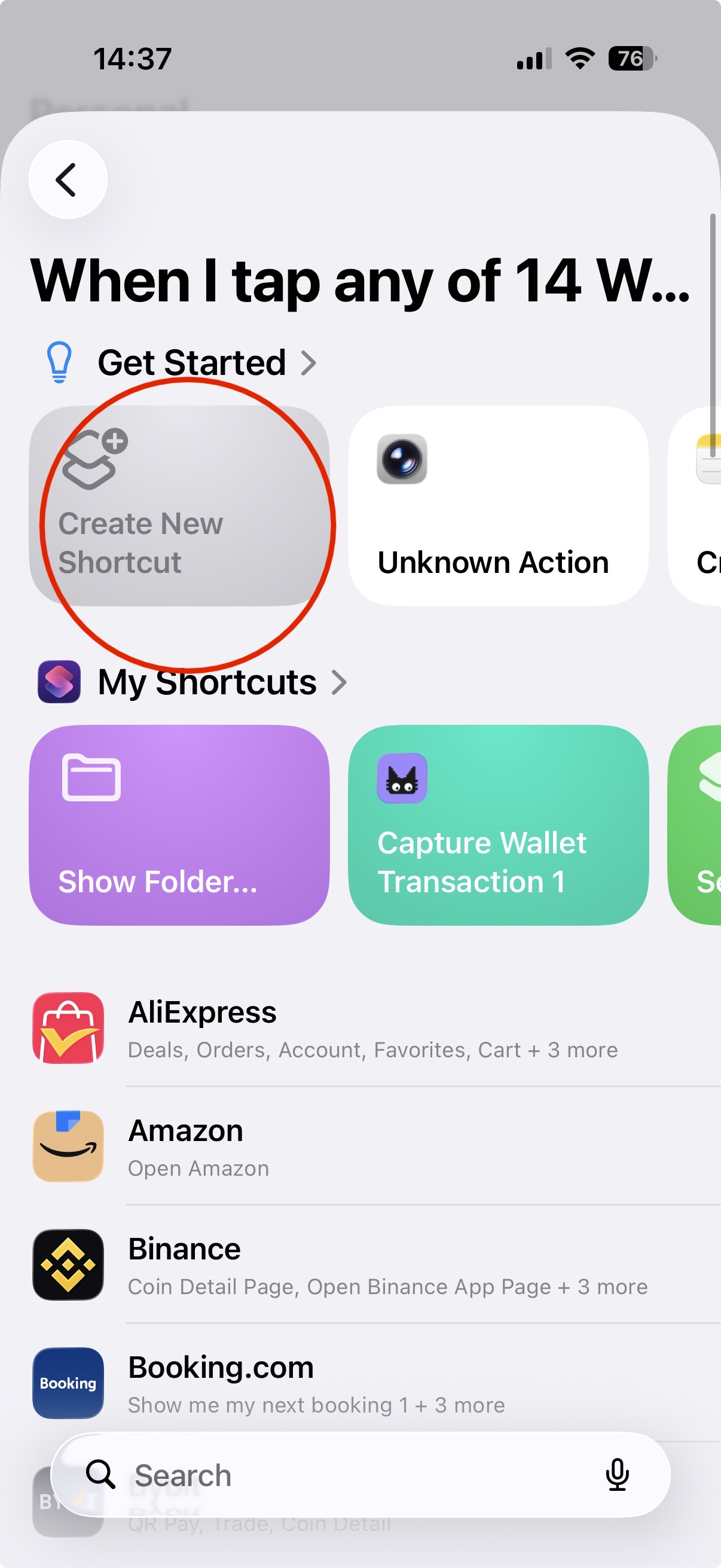
Watch the full setup tutorial above — see exactly how to configure the Apple Wallet Shortcut step by step.
Once configured, every time you pay with Apple Pay, the shortcut can log the transaction directly into Moneko — merchant, amount, and date — without you having to type anything.
Current product update — September 24, 2026: Moneko also supports notification capture on iOS 27 or later. Choose the apps whose notifications should trigger it, then add Moneko's Capture Transaction Notification action in Shortcuts. This can capture supported completed transactions from payment notifications; it does not give Moneko access to every notification or connect directly to your bank. See the iPhone notification capture setup guide.
What Moneko does with Apple Wallet spending:
- Log Apple Pay transactions instantly via notification forwarding, iOS Shortcuts, or text
- Allocate spending to the right monthly pocket automatically
- Tell you what is left in each pocket at any moment
- Send budget alerts when a pocket is running low
- Generate monthly summaries across all pockets
Best for: iPhone users who want envelope budgeting on top of Apple Pay spending without connecting their Apple Card to any third-party service.
2. YNAB — Best for Deep Envelope Budgeting with FinanceKit
Apple Pay Integration: Native via FinanceKit (Apple Card, Apple Cash, Apple Savings) Bank login required: Yes (for non-Apple accounts) Envelope budgeting: Yes — zero-based budgeting Price: USD 99/year YNAB was one of the first apps to support Apple's FinanceKit API when it launched in March 2024. For Apple Card users, this means your transactions import automatically into YNAB without any manual effort — the first time this has ever worked cleanly for Apple Card. YNAB's envelope methodology (zero-based budgeting) is the gold standard for structured monthly budget control. Every dollar gets assigned a job before the month starts. Every Apple Pay transaction imports automatically and gets matched against your envelope allocations. The trade-offs: YNAB costs USD 99/year, has a genuine learning curve that can take several weeks to master, and requires Plaid connections for any non-Apple bank accounts. Best for: Committed budgeters who use Apple Card as their primary card and want the most powerful envelope system available on iOS.
3. Monarch Money — Best for Full Financial Dashboard
Apple Pay Integration: Native via FinanceKit (Apple Card, Apple Cash, Apple Savings) Bank login required: Yes (Plaid for other accounts) Envelope budgeting: Category-based (not traditional envelope) Price: USD 99.99/year Monarch was one of the earliest FinanceKit adopters and has built the most polished Apple Card integration available in 2026. Beyond budgeting, Monarch gives you investment tracking, net worth dashboards, shared household finance tools, and detailed spending trend analysis. If you want a complete financial picture — not just monthly budgeting but your full net worth, investments, and all accounts in one place — Monarch is the most comprehensive iOS option. The trade-off: it is expensive, requires Plaid for non-Apple accounts, and the category-based budgeting approach gives you less proactive monthly control than a true envelope system. Best for: Users who want a full financial dashboard with Apple Card sync and are willing to pay for it.
4. Copilot — Best for AI-Powered Spending Insights
Apple Pay Integration: Native via FinanceKit (Apple Card, Apple Cash, Apple Savings) Bank login required: Yes (Plaid) Envelope budgeting: Limited — category budgets rather than envelopes Price: USD 79.99/year (USD 13/month) Copilot is the most design-forward budgeting app on iOS and was among the first to support FinanceKit. It uses AI to automatically categorise your Apple Card transactions, spot recurring subscriptions, flag unusual spending, and give you weekly spending digests. The interface is genuinely beautiful and the automatic categorisation is the best in class — it rarely gets a category wrong and learns from corrections quickly. The trade-offs: no true envelope budgeting system, requires Plaid for non-Apple accounts, and the price is steep for what is primarily a tracking and insights tool rather than a structured budget manager. Best for: iPhone users who want smart, automated spending insights on top of Apple Card transactions and do not need strict envelope-style monthly control.
5. WalletPal — Best for Apple Pay-First Automatic Tracking
Apple Pay Integration: Automatic Apple Pay transaction capture Bank login required: No Envelope budgeting: Basic budget categories Price: Free with in-app purchases WalletPal is built specifically for Apple Pay users. It automatically tracks tap-to-pay transactions — capturing the name, amount, location, date, and category — without requiring any bank connection. The approach is smart: instead of connecting to your bank, it reads Apple Pay confirmation data directly on your device. No Plaid, no credentials, no third-party bank access. The trade-offs: basic budget categories rather than a full envelope system, and the feature depth is lighter than YNAB or Monarch. Good as a starting point, but limited for serious monthly budget management. Best for: Casual Apple Pay users who want automatic expense capture without any bank login and do not need structured envelope budgeting.
6. MoneyCoach — Best for Apple Ecosystem Integration
Apple Pay Integration: Via manual entry and Apple Watch support Bank login required: Optional (supports 2,800+ European banks) Envelope budgeting: Budget goals and limits Price: Free with premium tier MoneyCoach has been a fixture of the Apple ecosystem for years — it supports iPhone, iPad, Mac, and Apple Watch, with iCloud sync across all devices. With over 1 million downloads and a 4.5 App Store rating, it has proven staying power. The Apple Watch integration is particularly useful for Apple Pay users: you can log an expense or check a budget balance directly from your wrist immediately after a tap-to-pay transaction. The trade-offs: the envelope budgeting implementation is less strict than YNAB or Moneko — it uses goal-based limits rather than true zero-based pocket allocation. Best for: Heavy Apple ecosystem users who want budget tracking across iPhone, iPad, Mac, and Apple Watch simultaneously.
7. Balance — Best for Privacy-First Local Budgeting
Apple Pay Integration: Via iCloud sync only (no bank connection) Bank login required: No Envelope budgeting: Manual category tracking Price: One-time purchase Balance stores all data locally on your device and syncs only via your private iCloud database — no analytics, no tracking, no telemetry, no third-party servers. For privacy-conscious iPhone users who are uncomfortable with any cloud-based financial service, Balance offers a clean, thoughtfully designed alternative. The trade-offs: fully manual entry, no Apple Pay auto-capture, no FinanceKit integration. You gain maximum privacy at the cost of convenience. Best for: Privacy-first users who want local-only budgeting on iPhone with iCloud sync and are comfortable with manual expense entry.
The Honest Reality About Apple Wallet and Budgeting in 2026
Here is something most articles will not tell you directly: Apple Wallet itself is not a budgeting tool and Apple has no plans to make it one. Apple's design philosophy is clear — Wallet handles payments and stores your cards. The FinanceKit API gives approved apps access to Apple Card transaction data. But Apple Wallet will never show you envelope budgets, pocket balances, or monthly spending alerts. That is not what it is for. This means iPhone users have two distinct paths to building a budget on top of Apple Wallet spending: Path 1 — Connect Apple Card via FinanceKit: Use YNAB, Monarch, or Copilot to automatically import Apple Card transactions. Powerful and hands-off for Apple Card users — but requires a paid subscription, Plaid for non-Apple accounts, and only covers Apple Card spending (not other cards in Wallet). Path 2 — Log Apple Pay purchases in real time via chat: Use Moneko to log Apple Pay transactions the moment they happen — via WhatsApp notification forwarding, text, or voice note. No bank connection required. Full envelope pocket budgeting. Works for any card you pay with (Apple Card, Visa, Mastercard, debit) because you are logging the spend directly rather than importing from a bank. For privacy-conscious users, frequent travellers, or anyone who uses multiple cards (not just Apple Card), Path 2 is the more flexible and private approach.
The Setup That Works Best for Most iPhone Users in 2026
After looking at every option available, the most practical setup for the majority of iPhone users is a hybrid approach: Step 1 — Use Apple Wallet normally Pay with Apple Pay for everything you can. Let Apple Wallet do what it does brilliantly — contactless payments, receipts, Apple Card management. Step 2 — Set up monthly pockets in Moneko At the start of each month, allocate your income across named pockets: rent, groceries, dining, transport, fun, savings. Takes under 10 minutes. Step 3 — Forward Apple Pay notifications to Moneko Every time Apple Pay confirms a transaction on your iPhone, forward that notification to Moneko in WhatsApp. Moneko reads the amount and merchant, allocates it to the right pocket, and confirms the remaining balance. Step 4 — Check your pocket balances during the month Ask "how much is left in my dining pocket?" at any point. Get an instant answer without opening any app beyond WhatsApp. Step 5 — Reset at the start of each month Pocket amounts carry over automatically. Adjust any that need changing and confirm. Done in under two minutes.
Who Should Use Which Setup
- You use Apple Card as your primary card and want hands-off sync → YNAB or Monarch via FinanceKit
- You want envelope budgeting with maximum privacy and no bank connection → Moneko with Apple Pay notification forwarding
- You want beautiful AI-powered spending insights on Apple Card → Copilot
- You want automatic Apple Pay capture without any bank login → WalletPal
- You want the full Apple ecosystem experience across iPhone, Mac, and Apple Watch → MoneyCoach
- You want local-only privacy with zero third-party involvement → Balance
The Gap That Still Exists — And How to Fill It
The honest gap in Apple's ecosystem in 2026 is this: there is no native way to go from "I just tapped Apple Pay" to "I know exactly how much is left in my monthly dining budget" without either connecting your Apple Card to a third-party app or logging that transaction manually. FinanceKit solves the import problem for Apple Card users but still requires a paid subscription to a third-party budgeting app and gives you no real-time pocket balance awareness — you still have to open the app and check. Moneko closes that gap differently. Because logging happens in WhatsApp — the app you are already in — and the pocket balance comes back in the same message thread, the feedback loop from "spending money" to "knowing what is left" is as fast and frictionless as sending a text. For iPhone users who have tried YNAB and found it too complex, or who pay with multiple cards and find FinanceKit too limited, Moneko's approach is worth a serious look.
If you want a broader decision guide after reading this article, compare the best budgeting apps in 2026, review the best free budgeting apps, or see Moneko's Apple Wallet budgeting app page and YNAB alternative page.
FAQs
Why is the shortcut not asking me to map fields when I choose "Capture Wallet Transactions"?
You need to tap Create New Shortcut first, then select Capture Wallet Transactions from the list. If you skip the "Create New Shortcut" step and try to add the action directly, the Shortcuts app may not prompt you to configure the required fields (merchant, amount, and date). Starting with "Create New Shortcut" ensures the workflow is initialized correctly and the mapping step appears as expected.
Try Moneko free — Apple Pay budgeting with envelope pockets, no bank login required.
